

Offline Batch Type
Last Updated: Version R2510The Offline Upload Agent supports high-volume document scanning with near real-time review capabilities. Documents are processed locally on the operator’s workstation, significantly reducing the delay before scanned images are displayed. Users can scan documents, and they are automatically separated according to defined profiles. Supported separation methods include manual selection, page count, barcode detection and patch code recognition.
This features allows Operators to review documents almost immediately as they are being scanned.
To use this option, users must install the Ricoh web scanning service. Refer users to Install the Ricoh Web Scanning Service for instructions.
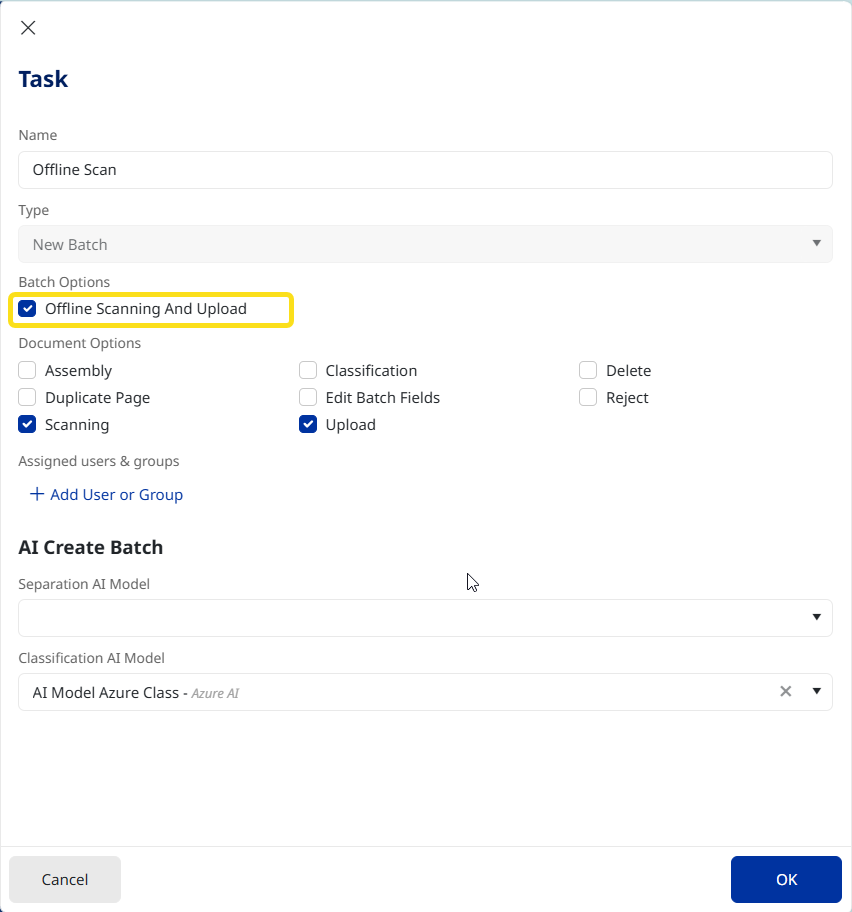
The Offline Scanning and Upload option appears within the Task element of a Process Flow, shown below. Refer to Process Flow: Task for instructions.
When the Operator selects a Batch type with a task that has Offline Scanning and Upload enabled, three separation options are available: Barcode, Patch page, and Page count separation.
Operators can proceed to quickly upload a large number of documents, and can quickly review the results as they are loaded offline, rather than fully processed before presenting the preview on screen.