

Design a Process Flow
Last Updated: Version R2601A user with Designer access level is responsible for creating process flows.
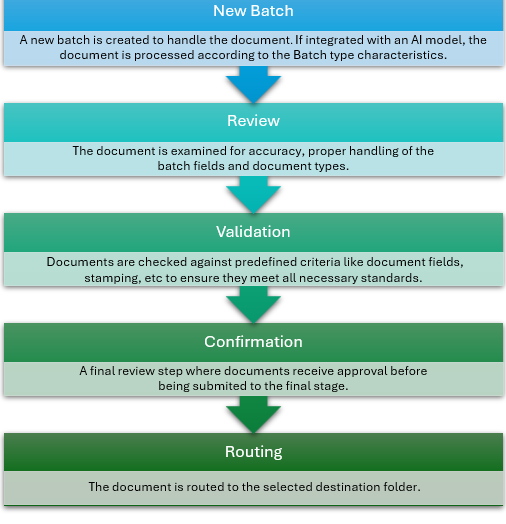
A process flow provides the structure of the document's flow through the system. Each Batch Type must include a process flow. A flow can be as simple as a single step, or might consist of a complex combination of steps that could include AI validation, business decisions based on procured data from the document, and document routing. From the Operator standpoint, the workflow generally consists of five key stages as illustrated below, but every process flow can be fully configured by a Designer when designing batch types.
-
Process Flow Example: Legal Data Identification, Extraction, and Storage
-
Process Flow Example: Capture Documents from OneDrive Storage
-
Process Flow Example: Import Documents from Microsoft Outlook Email Folder
Process from the Operator Point of View
The graphic below depicts a general Process Flow as the Operator would experience it. However, the Designer may not require both Validation and Confirmation, and therefore the process flow might only consist of four steps, rather than the five shown below. There may be no Review step, yet a Validation step is necessary — each process flow is fully configurable by the Designer.
Building a Process Flow
The Process Flow building screen is accessed through the Create New Batch Type screen. Scroll to the bottom of the screen to view the Process Flow field and click the gear icon  to open the Configure Process Flow screen. As demonstrated in the clip below, a new flow is empty until you drag and drop building blocks from the Steps on the left to the flow.
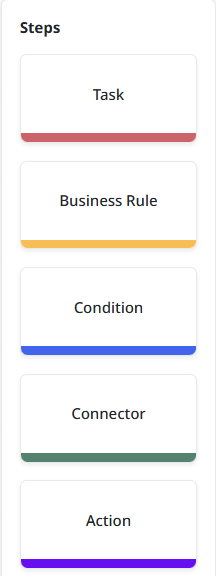
The following building blocks can be used to build a process flow:
-
Process Flow: Task Tasks can include Import (from a defined MS OneDrive location), Review, Validation, Confirmation, or Routing.
-
Process Flow: Business Rule Automated actions created by the designers at either the Batch or Document level which can be executed in the process flow as well in the document life cycle. Business rules can be applied based on particular criteria, and the process flow can diverge depending on if the criteria is met or not. For example, a rule could be used to convert a value from one format to another (i.e. a date format), or to calculate the number of days between dates.
-
Process Flow: Condition Decision points placed either both or after a task that direct the process flow based on whether documents match specific criteria.
-
Process Flow: Connector Connect to an AI model to perform Document Separation, Document Classification, or Data Extraction.
-
Process Flow: Action Splits the batch based on the number of documents scanned or uploaded into independent batches.