Process Flow: Business Rule
Last Updated: Version R2510A business rule is an automated action that occurs at either the Batch or Document level, which can be executed in the process flow. Business rules can be applied based on particular criteria, and the process flow can diverge depending on if the criteria is met or not. For example, a rule could be used to convert a value from one format to another (i.e. a date format), or to calculate the number of days between dates.
A business rule can determine if an invoice has met the AP payment terms. The rule itself can perform the calculation between dates and then you can add conditions to the process flow that determine the results depending on if the terms are met or not. For example, if the AP terms are 30 days, but the calculation between the invoice date and the current date is 25 days, the document may be routed a different store location until payment is required vs. if the date exceeded 30 days.
Batch vs. Document Business Rules
There are two types of Business Rules: Batch and Document. Batch Business Rules must be defined within the Batch type definition before you begin configuring the process flow. Otherwise, the rule will not appear in the pick list when needed. Document Business Rules can be added and configured directly in the Process Flow. However, these rules are limited to date-specific rules only including Set Date Exceeds True, Date Limit, or Set Date Exceeds False.
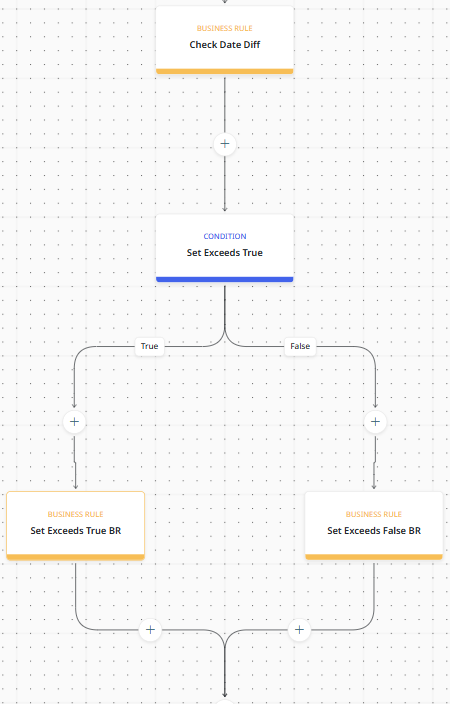
In the example flow shown below, a combination of business rules and a condition determine the document handling. The first business rule calculate the date differential, and then the condition stop the process to branch if true or false. The branched business rules handle the document differently based on the result of the initial date calculation.